Guatemala Contracts Module Documentation
Use Case/Description Temporary Employees
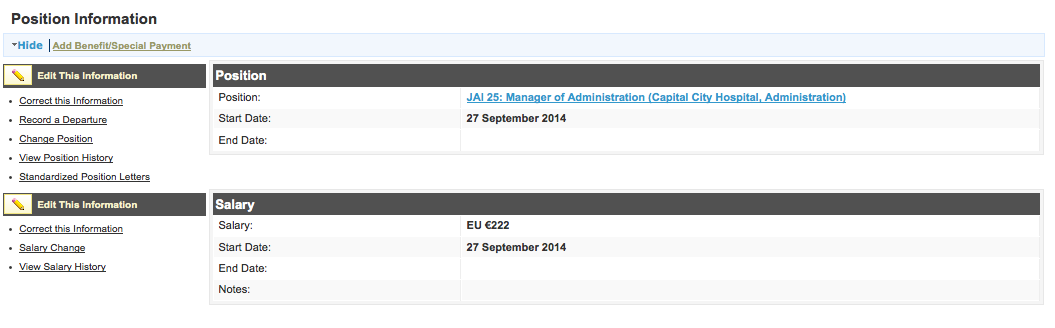
For temporary employees we have the contract+total_amount that we want to calculate from the salary. The process for assigning a temporary employee a position is three steps.
Assigning a new position
Assign the contract and position to a person
Search for/create the person who is the temporary employee
Assign the person a position
If the person already has a position, we should “Change Position”
If the person does not have a position we should “Set Position”
The position is selected by the user
Set salary information
Monthly Salary Amount
Set the contract information
Start Date
End Date
Contratista
Contract Type
etc…
The user ‘saves’ the associated position information
the total amount of the selected contract is calculated based on the most recent salary
Changing the Salary
The current contract should be closed and a new contract should be created.
User search for desired employee
User select to “Change Salary”
New salary information is saved
Old salary end_date is set to new salary start date if it has not already been set
A new contract is created copying the details of the old contract except dates, and total amount?
The new contract’s total_amount is calculated to new salary
Old contract end_date is set to new salary start date if it has not already been set (THIS MAY BE AN ISSUE if the contract already has a different end date)
Renewing a Contract
A new contract should be created and assigned to the existing position.
User searches for the desired temporary employee
User select “Renew Contract”
User enters new contract information
start date
end date
User saves contract
old contract details except dates and total_amount are copied into new contract
total_amount is calculated based on the most recent salary
In the following we want to add a place for contract that is like salary
Use Case/Description Permanent Employees
Permanent employees are tracked according to a separate partida mechanism, “Permanent Partida”
Assigning a new position
Create a Partida_Perm (permanent partida)
Create A Position
Create a new employee or search for an existing employee
Assign the person a position
If the person already has a position, we should “Change Position”
If the person does not have a position we should “Set Position”
User selects the position to associate to the person
User select the permanent partida to assign to the person
User sets the salary information
User saves the associated position information
Assigning a new permanent partida
On an (at least) annual basis, a new partida permanent is assigned to the employee. In this case the new partida_perm is created and a new person_position form is created to track this.
Create a Partida_Perm (permanent partida)
Search for employee
Click on “Update Permanent Partida” under the current position information#User selects the new permanent partida
User Saves the partida
A new person_position object is created and populated with the existing person_position information except the partida_perm
The partida_perm field of the person_position is set to be the selected partida_perm
Data Model
- <graphviz border=’frame’ format=’png’>
digraph “Contract Module” {
person [shape=box] person_position [shape=box] salary [shape=box] contract [ shape=box] position [shape=box] phase_status[shape=box] phase_status_decision [shape=box] phase_status_stage [shape=box] contract_status [shape=box] contract_type [shape=box] resolution [shape=box label=”resolutionndate(DATE_YMD)nunidadejectora(MAP)nfile(FILE)”] unidadejectora [shape=box] partida_temp [shape=box label=”partida_tempnyear”] partida_perm [shape=box label=”partida_permnincremental counter”] phase_status_doc [label=”phase_status_docnfile(FILE)nnotes(MLINE)” shape=box]
person->person_position [color=red] person_position->salary [color=red] person_position->position contract->partida_temp person_position->partida_perm person_position->contract [color=red] contract->phase_status [color=red] contract->contract_type contract->contract_status contract->resolution resolution->unidadejectora partida_temp->unidadejectora partida_perm->unidadejectora phase_status->phase_status_doc [color=red] phase_status->phase_status_stage phase_status->person [label=approver] phase_status->phase_status_decision
} </graphviz>
[[Guatemala Contracts Module Documentation Alt]] [[Guatemala Contracts Module Documentation Alt2]] [[Guatemala Contracts Module Documentation Alt3]]